" height="18.205000133514407px" id="Q9ldQFEPI" width="99.29999682617188px"/></svg>)

Building for voice in emerging markets quickly exposed a practical reality: production quality depends on much more than the model or the prompt.
The call path matters. So does the latency of the audio loop, the fit of the voice, the context available to the agent, the tools it can call mid-conversation, and the controls teams need to review, secure, and debug the system after every interaction.
At AethexAI, we build for that full surface area. We host, train, and orchestrate the voice stack in-house, so teams can deploy voice agents that are fast, context-aware, locally adapted, and production-ready from day one.
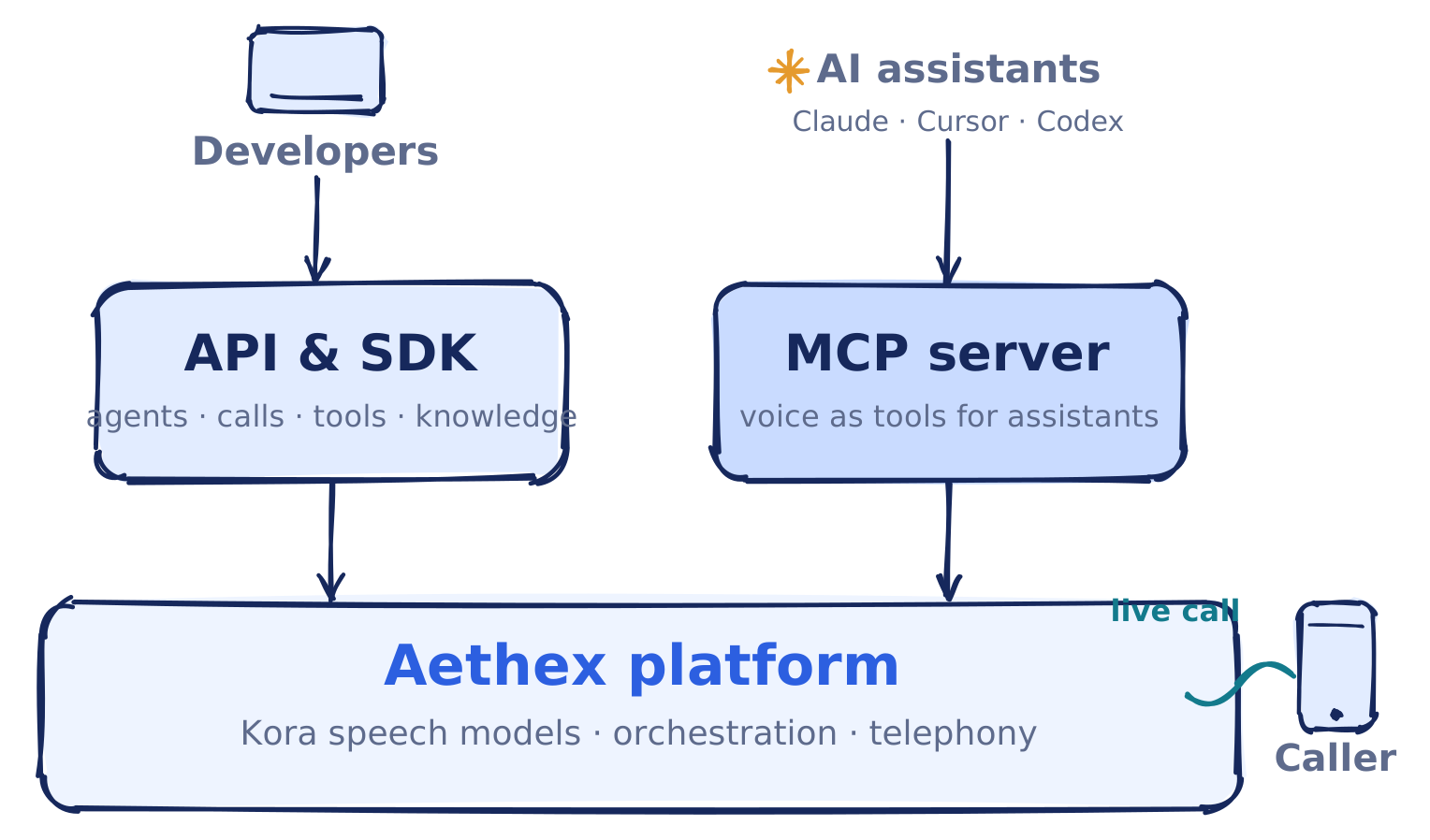
Aethex is the voice-agent control plane for emerging-market workflows. This is the surface we expose to developers:
Kora, our speech model family for streaming speech-to-text and text-to-speech.
The Aethex API and SDK, which expose agents, calls, tools, transcripts, knowledge bases, and usage as programmable primitives.
The Aethex MCP server, which makes the same infrastructure available to AI assistants through the Model Context Protocol.
This post walks through that stack for everything you need as a developer: how the voice layer connects to the agent runtime, how an agent becomes grounded and action-capable, how calls become observable conversations, and how the security model keeps a system that can place calls and invoke tools safe to operate.
Models and speech capabilities
At the base of Aethex is Kora, our speech model family. More on the model training pipeline in a future blog.
Kora Read powers speech-to-text (STT)
Kora Speak powers text-to-speech (TTS)
Together they provide the speech layer for our agents, and for developers who want to use speech directly through the API.
The speech capabilities stand on their own. You can synthesize audio from text, stream generated audio for real-time playback, transcribe uploaded audio, preview voices, list the catalog, and inspect the models available to your account. A conversational workflow uses the same speech layer inside an agent that handles the full call. The same primitives serve all three.
Voices are exposed as resources with metadata, so they fit inside real product flows instead of being hard-coded. Filter the catalog by language, dialect-style support, tag, and country, and use voice tags to find delivery styles and business personas such as warm, calm, professional, technical, service-oriented, or trustworthy.
The reasoning model is the configurable stage in the call flow. An agent can use the Aethex default, co-located with Kora Read and Kora Speak, or pin behavior to a third-party model from a provider such as OpenAI, Anthropic, or Google. Either way, the speech layer, agent behavior, tools, knowledge, and call lifecycle stay inside one platform.
Agents as the deployable runtime
The main object in Aethex is the agent.
An agent holds the configuration for a live voice workflow: name, system prompt, first message, voice, language, dialect style, LLM model, temperature, duration limits, silence handling, interruption behavior, guardrails, script adherence, recording and transcription settings, voicemail behavior, dynamic variables, transfer behavior, metadata, knowledge-base documents, tools, and a webhook URL.
from aethexai import AethexAI
client = AethexAI(api_key="ae_live_...")
agent = client.create_agent(
name="Collections agent",
system_prompt="Verify the borrower before discussing the account.",
first_message="Hello, this is a courtesy call from your lender.",
voice_id="Femi",
language="english",
)
Once the agent exists, it is the unit teams iterate on. Update the prompt, swap the voice, change the LLM model, attach a document, register a tool, duplicate the agent for a new workflow, trigger a test call, inspect the transcript, and move the configuration into production behind the right scoped key.
A collections agent might start with a strict script and an identity-verification tool, then add a knowledge base for payment plans. A support agent might use a warmer voice, product documentation, order lookup, and a transfer path. A survey agent might use shorter responses, stronger script adherence, and structured metadata. Each workflow gets its own runtime configuration without forcing teams to rebuild the stack around it.
Knowledge bases for grounded conversations
Enterprise agents need the materials the business already trusts: product policies, eligibility rules, payment scripts, onboarding guides, clinic instructions, disclosures, support playbooks, and escalation procedures. Aethex knowledge bases let you attach that context directly to an agent.
The knowledge-base API supports file uploads and text documents, staged uploads, document processing, listing, reprocessing, deletion, full extracted-text retrieval, and retrieval queries for debugging. That last piece matters: before an agent goes live, you can test what the knowledge base returns for a question and inspect the chunks the agent would have during a conversation.
Voice changes the expectations around retrieval. In a text interface, a slow answer may be acceptable. On a call, the retrieval step sits inside a live turn alongside reasoning and speech generation, so the agent has to find the relevant context, produce a response, and keep the conversation moving without leaving the caller in silence. Treating knowledge as part of the agent runtime also keeps it improvable: update the source material, reprocess a document, query the knowledge base, review transcripts, and decide whether the agent needs better context, tighter instructions, or a new tool, without rebuilding the prompt from scratch.
Tools for live actions
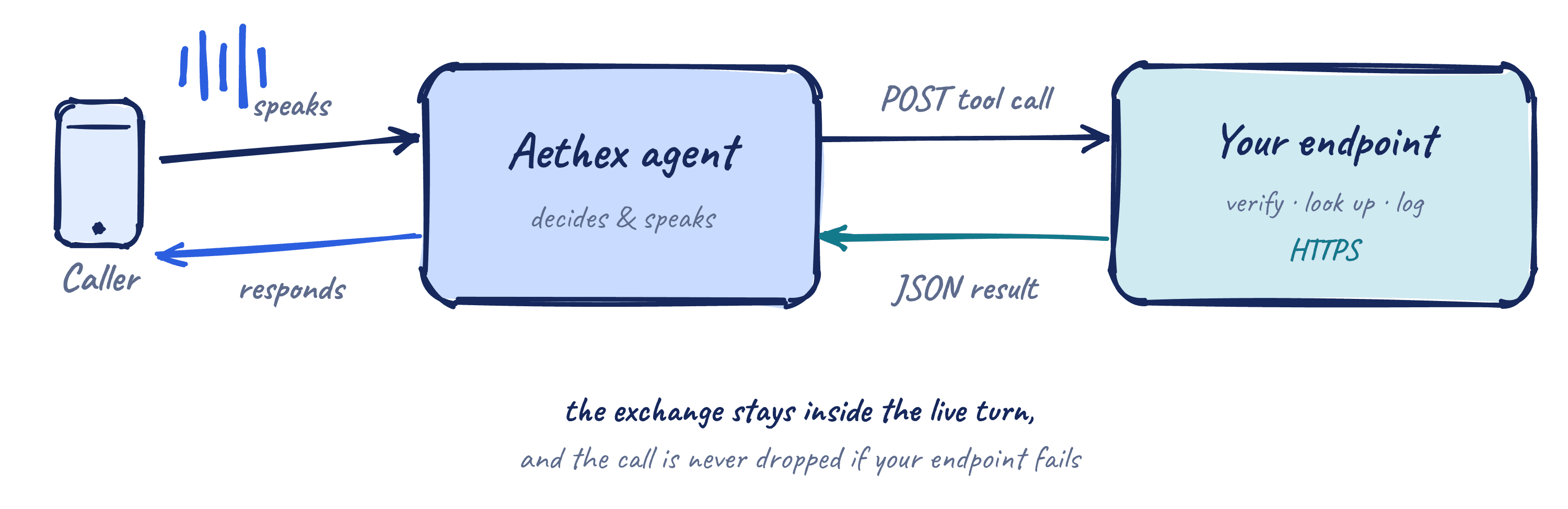
Tools connect an agent to external systems during a conversation. Each tool has a name, a description, a parameter schema, and an endpoint. The description helps the agent decide when the tool is relevant. The schema defines the information required to call it. The endpoint connects the conversation to the customer's system.
client.add_agent_tool(
agent["id"],
name="verify_account",
description="Verify a customer's account by ID before discussing balances.",
parameters={
"type": "object",
"properties": {"account_id": {"type": "string"}},
"required": ["account_id"],
},
endpoint_url="https://api.yourbank.com/aethex/verify",
)
A tool can verify an account, look up an order, check eligibility, create a ticket, update a CRM, log a promise to pay, trigger a notification, or schedule a callback. The agent keeps the conversation moving while the workflow reaches into the systems where the business process actually lives.
The validation around tools is part of the product. Tool names, schemas, and URLs are checked when the tool is created or updated, and endpoints must use public HTTPS; private, loopback, credential-embedded, and unresolved destinations are rejected. That keeps tool calling on a production integration surface rather than an unchecked prompt feature.
Live tool execution has a narrow tolerance for failure, and the runtime is built for it. A slow endpoint becomes a pause the caller hears, a missing parameter becomes a follow-up question, and a failed request becomes a retry, an explanation, or a transfer. The call is not dropped because an external service failed. This is the layer that turns a conversational interface into an operational system.
Calls, conversations, and recordings
With an agent configured, you place calls through the API. We support integrations with BYO SIP trunking , WebRTC, Twilio, with more integrations on the horizon.
call = client.trigger_call(
agent_id=agent["id"],
to_number="+234...",
from_number="+234...",
)
The call brings the stack together: speech models, voice selection, agent instructions, LLM settings, knowledge retrieval, tool execution, call behavior, recording, transcription, metadata, usage, and permissions.
When the call ends, the platform preserves the artifacts teams need to operate. Inspect call status, retrieve conversations, access recordings, review transcripts, search history, and account for usage. A QA team builds review queues. An operations team looks for drop-offs, transfers, failed tool calls, and recurring objections. A compliance workflow preserves recordings and transcripts for later review.
To play recordings back in a customer-facing UI, mint a short-lived signed URL scoped to one conversation and hand it to the browser; it expires quickly, carries no other authority, and keeps the audio path controlled even when it leaves your server. A single test call can be judged by ear; a production deployment needs structured records, and calls become conversations you can search, audit, and connect to internal systems.
Voice workflows often continue after the call ends. Aethex sends signed outbound webhooks for events such as call.ended and recording.ready, so teams receive call metadata, final transcripts, and recording URLs without polling. A completed collections call updates an internal dashboard. A support conversation enters a QA queue. A recording moves to storage once recording.ready arrives. A transcript triggers analytics, scoring, or follow-up.
Because these events touch customer workflows, they are signed with HMAC-SHA256 against a tenant secret you can rotate, so the receiving system can verify a callback came from Aethex before accepting the payload.
MCP for assistant-driven development
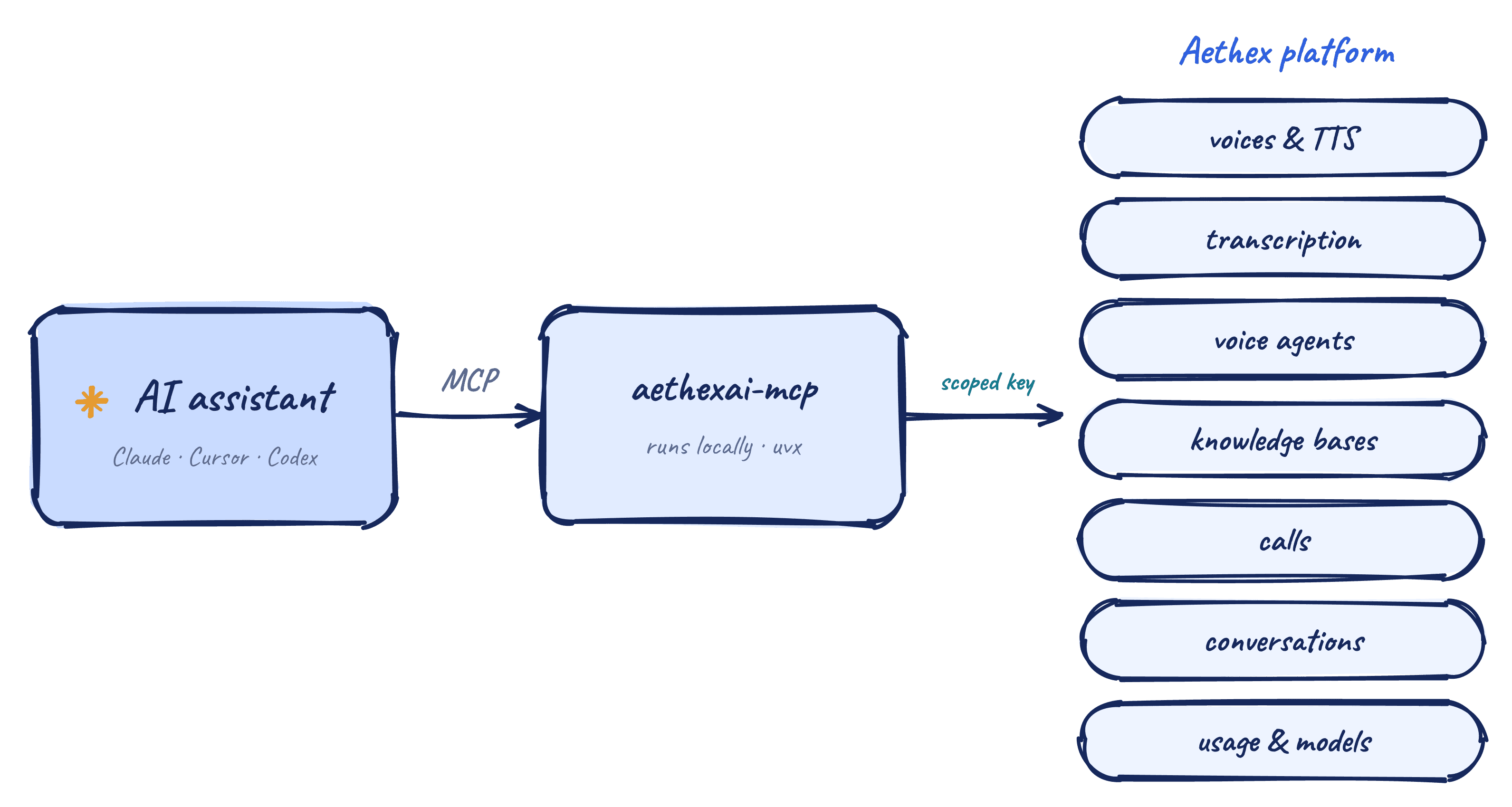
The Aethex MCP server brings the same platform into AI assistants through the Model Context Protocol, so you can work with Aethex from Claude Code, Claude Desktop, Cursor, Codex, Windsurf, and other MCP-compatible clients.
claude mcp add aethex \
--env AETHEX_API_KEY=your-api-key \
-- uvx aethexai-mcp
Through MCP, an assistant can list voices, synthesize speech, transcribe audio, build agents, place calls, and read usage through the public API. The server ships as the aethexai-mcp package, runs locally, launches with uvx, and uses the API key provided in its environment, so there is nothing to host.
The security model stays the same. The MCP server inherits the scopes of the key it receives. Give it a read-only key and it can inspect. Give it a test key and it can help build. Keep production calls behind a separate key and the assistant stays within that boundary. It looks up real IDs before acting and confirms sensitive actions such as deletes, cancellations, and outbound calls before executing them.
That changes the development loop. Ask an assistant to create a test agent, attach a document, register a tool, place a call, retrieve the transcript, and summarize what changed. The API remains the source of truth. MCP becomes another interface to the same platform.
Putting the stack together
Aethex is organized around the lifecycle of a production voice agent. Start with speech: generate audio, transcribe recordings, inspect voices, and choose model behavior. Configure an agent with the right voice, language, instructions, guardrails, call settings, and metadata. Attach a knowledge base so the agent can answer from business context. Add tools so it can act during the conversation. Place calls, capture recordings and transcripts, receive signed webhooks, inspect usage, and control access with scoped keys. Bring the same workflow into an AI assistant through MCP when that is the fastest way to build or test.
For the markets Aethex serves, the full stack matters. Network topology affects turn latency. Voice quality affects trust. Tool execution determines whether the agent can complete the workflow. Knowledge bases determine whether answers are grounded. Usage affects unit economics. Security determines whether the system can be safely deployed inside an enterprise. The developer surface reflects those constraints: models, voices, agents, tools, knowledge bases, phone numbers, calls over phone and browser, conversations, recordings, transcription, usage, rate limits, API keys, webhooks, SDKs, and MCP in one platform.
Get started
Quickstart: developers.aethexai.com/docs/quickstart
Python SDK: developers.aethexai.com/docs/sdk
MCP server: developers.aethexai.com/docs/mcp
API reference: developers.aethexai.com/docs/api-reference
GitHub: github.com/aethexai
Building something that needs voice to work in the real world? Find us on Discord or @aethexailabs on X!

" height="48px" id="GUWw61FwZ" width="48px"/></g></svg>)
" height="39.77194px" id="u4BE2MQos" transform="translate(2 3.808)" width="44px"/></svg>)
" height="47.200121890287576px" id="H2XXrumOQ" width="48.000007146720094px"/></g></svg>)
" height="36.58656032986642px" id="JYRMZCWYV" transform="translate(0 5.278)" width="47.99999468333146px"/></svg>)