" height="18.205000133514407px" id="Q9ldQFEPI" width="99.29999682617188px"/></svg>)
Blogs
Give your app a voice with Aethex React SDK
Give your app a voice with Aethex React SDK
Published
•
Written by
Ayooluwa Odemuyiwa
5 min Read
Keep Reading

Give your app a voice with Aethex React SDK
Introducing the Aethex React SDK
Start a live voice call with one hook, on the web or in React Native. Drop in ready-made UI, or build your own. There is no WebRTC to wire up.
The short version
@aethexai/reactv1.0.0 is on npm todayOne hook,
useAethexCall(), runs the call. Three ready-made widgets sit on top of it if you don’t want to build a button.New in 1.0.0: React Native support, in-call mute and hang-up controls, and post-call feedback.
Ships ESM, CJS, and types. SSR-safe, StrictMode-safe, and accessibility-checked with axe
What we’re shipping
Today we’re releasing v1.0.0 of the Aethex React SDK, the official way to put a live voice agent into a React app.
Most voice SDKs are headless. They hand you a transport layer and a set of callbacks, and then you spend the next week building a call button: the idle state, the connecting state, the microphone-denied state, the animation that tells users the thing is actually listening, the keyboard support, the screen reader announcements. The plumbing was never the slow part. The interface was.
So this SDK ships both, and lets you choose your altitude.
At the top, one line renders a finished voice button. At the bottom, a framework-agnostic VoiceCall class you can drive yourself. In between, a hook and a set of widgets. You can move between them without changing your auth setup or rewriting your call logic.
Start with the hook
useAethexCall() is the whole SDK in one call. It handles microphone permissions, the WebRTC peer connection, and teardown, and hands you back plain React state
"use client"
import { useAethexCall, useAudioLevel } from "@aethexai/react"

export function CallButton() {
  const { status, isConnected, start, stop, remoteStream, error } = useAethexCall({
    agentId: "YOUR_AGENT_ID",
    getToken,
    onConnected: () => console.log("live"),
    onError: (e) => console.error(e.code, e.recoverable),
  })
  const { level } = useAudioLevel(remoteStream)

  if (error) return <p>Call failed: {error.code}</p>
  return (
    <button onClick={isConnected ? stop : start}>
      {status === "connecting" ? "Connecting…" : isConnected ? "Hang up" : "Call"}
    </button>
  )
}
Two details worth knowing. start() never throws, so you render from status and error instead of wrapping calls in try/catch. And the hook is SSR-safe, meaning it touches no browser APIs at import or render, and StrictMode-safe, meaning teardown is idempotent. The React entry ships a "use client" banner, so it drops into the Next.js App Router without a fight.
After the call, pull the conversation with getTranscript({ apiBaseUrl, sessionId }). Read your transcripts. They’re the best prompt-debugging tool you have.
Or skip the UI work entirely
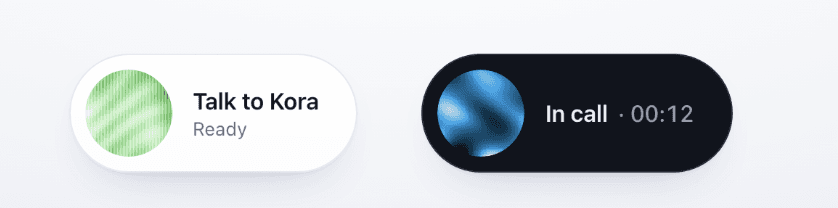
If you don’t want to build the button, AethexVoiceOrb is a finished one: an orb, a label, and live status in a themeable capsule, light or dark.
import { AethexVoiceOrb } from "@aethexai/react/widgets"

<AethexVoiceOrb agentId={AGENT} getToken={getToken} title="Talk to Kora" />
It floats bottom-right by default, the usual spot for a voice or chat bubble. Pass float={false} to inline it, or adjust with float="bottom-left", floatOffset, and zIndex.
Two more widgets ship alongside it. AethexCallButton is a plain button, and AethexVoiceWidget is a panel with a title. Both are web-only. On native, use the orb or build on the hook.
Keeping your key off the client
Your API key must live on your server. Anything you ship to the browser is readable by anyone who opens devtools. The SDK is opinionated enough to throw if apiBaseUrl looks like a key.
There are two supported flows, and the second is usually the one you want.
Proxy. Point apiBaseUrl at a small server that forwards requests and attaches your key. A production-shaped Cloudflare Worker example ships with the repo.
Ephemeral tokens. Instead of proxying every request, mint a short-lived token on your server and hand it to the client through getToken. The SDK then talks to the Aethex API directly, so you host a one-line mint route rather than a full proxy:
useAethexCall({
  agentId,
  getToken: async () => {
    const res = await fetch("/api/aethex-token", { method: "POST" })
    return (await res.json()).token
  },
})
Your mint route calls POST /api/v1/conversation/token with your API key. The token is scoped to one agent and expires with the call, so it’s safe in client code even if it leaks.
One caveat for browsers: callers need their origin allow-listed for CORS on the Aethex API. React Native has no such restriction, which is why getToken is the recommended flow on mobile.
Every agent gets its own orb
The orb isn’t a stock icon. It’s generated from the agent’s name, so every agent you create gets its own colour and texture without anyone designing one. agentName sets the seed and orbType picks the texture:
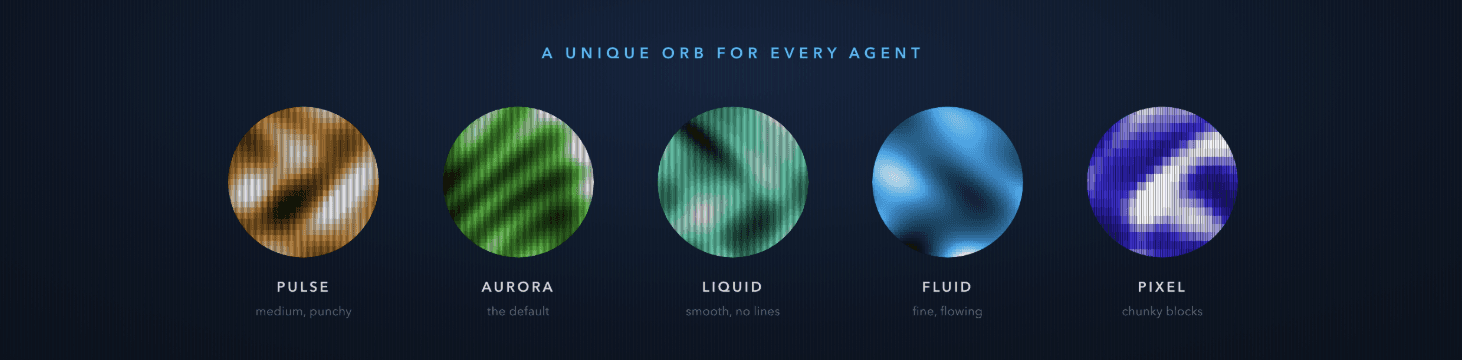
| Texture |
|---|---|
| Fine grain, the default |
| Medium blocks, punchy |
| Smooth, no scanlines |
| Fine and flowing |
| Chunky blocks with bold scanlines |
<AethexVoiceOrb agentId={AGENT} getToken={getToken} orbType="liquid" agentName="Kora" />
The orb is still at idle and animates only while connecting or in a call, so it isn’t competing with your interface for attention. It respects prefers-reduced-motion.
Prefer video? Pass videoSrc to show a looping muted clip masked to a circle. Two ship in the package, and they live as separate files rather than in the JS bundle, so the widgets stay small.
Controls and feedback, new in 1.0.0
The bare orb is a single tap-to-call button, which is the right default. Three props add more when you need it.
controls puts a mute toggle and a red hang-up button under the orb during a call. showVolume adds an output-volume slider on web. feedback shows a one-tap rating prompt once the call ends.
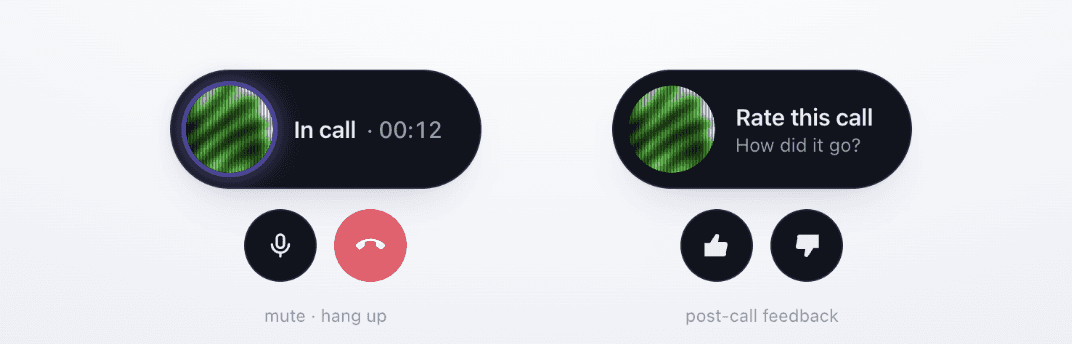
<AethexVoiceOrb agentId={AGENT} getToken={getToken} controls showVolume feedback />
Building your own UI instead? The hook exposes the same controls directly, including isMuted, toggleMute, setOutputVolume, and submitFeedback. Feedback posts against the call the token opened and works after the call has ended, so you can ask for a rating on a summary screen rather than interrupting the conversation.
React Native
The same hook runs on native. The package ships a native build that Metro resolves automatically, so the import doesn’t change:
import { useAethexCall } from "@aethexai/react"
Under the hood it runs on react-native-webrtc instead of browser WebRTC, and the agent’s audio routes to the device automatically. Because WebRTC is a native module, this needs an Expo development build and won’t run in Expo Go:
npx expo install react-native-webrtc @config-plugins/react-native-webrtc expo-dev-client
npx expo prebuild --clean
npx expo run:ios --device   # iOS needs a real device; the Simulator has no mic
The orb runs on native too, rendered with Skia rather than a DOM canvas, and takes the same props including controls and feedback.
Two honest limitations. The audio-level hooks and isSpeaking rely on Web Audio, so they read 0 on native; the orb self-animates during a call instead of reacting to the audio. And AethexVoiceWidget and AethexCallButton are web-only. A full runnable app lives in examples/expo-app.

Going lower
If you’re not using React at all, @aethexai/react/core exports VoiceCall, a plain TypeScript WebRTC client with the same lifecycle exposed as callbacks: onStatusChange, onRemoteStream, onMetrics, onError, onClose. stop() is idempotent, so it stops the mic, closes the peer, and tells the server, however many times you call it.
The core entry needs neither react nor react-dom.
Get started
npmCreate an agent, mint a token, mount the orb. We’d love to hear what yours says.
Give your app a voice with Aethex React SDK
Introducing the Aethex React SDK
Start a live voice call with one hook, on the web or in React Native. Drop in ready-made UI, or build your own. There is no WebRTC to wire up.
The short version
@aethexai/reactv1.0.0 is on npm todayOne hook,
useAethexCall(), runs the call. Three ready-made widgets sit on top of it if you don’t want to build a button.New in 1.0.0: React Native support, in-call mute and hang-up controls, and post-call feedback.
Ships ESM, CJS, and types. SSR-safe, StrictMode-safe, and accessibility-checked with axe
What we’re shipping
Today we’re releasing v1.0.0 of the Aethex React SDK, the official way to put a live voice agent into a React app.
Most voice SDKs are headless. They hand you a transport layer and a set of callbacks, and then you spend the next week building a call button: the idle state, the connecting state, the microphone-denied state, the animation that tells users the thing is actually listening, the keyboard support, the screen reader announcements. The plumbing was never the slow part. The interface was.
So this SDK ships both, and lets you choose your altitude.
At the top, one line renders a finished voice button. At the bottom, a framework-agnostic VoiceCall class you can drive yourself. In between, a hook and a set of widgets. You can move between them without changing your auth setup or rewriting your call logic.
Start with the hook
useAethexCall() is the whole SDK in one call. It handles microphone permissions, the WebRTC peer connection, and teardown, and hands you back plain React state
"use client"
import { useAethexCall, useAudioLevel } from "@aethexai/react"

export function CallButton() {
  const { status, isConnected, start, stop, remoteStream, error } = useAethexCall({
    agentId: "YOUR_AGENT_ID",
    getToken,
    onConnected: () => console.log("live"),
    onError: (e) => console.error(e.code, e.recoverable),
  })
  const { level } = useAudioLevel(remoteStream)

  if (error) return <p>Call failed: {error.code}</p>
  return (
    <button onClick={isConnected ? stop : start}>
      {status === "connecting" ? "Connecting…" : isConnected ? "Hang up" : "Call"}
    </button>
  )
}
Two details worth knowing. start() never throws, so you render from status and error instead of wrapping calls in try/catch. And the hook is SSR-safe, meaning it touches no browser APIs at import or render, and StrictMode-safe, meaning teardown is idempotent. The React entry ships a "use client" banner, so it drops into the Next.js App Router without a fight.
After the call, pull the conversation with getTranscript({ apiBaseUrl, sessionId }). Read your transcripts. They’re the best prompt-debugging tool you have.
Or skip the UI work entirely
If you don’t want to build the button, AethexVoiceOrb is a finished one: an orb, a label, and live status in a themeable capsule, light or dark.
import { AethexVoiceOrb } from "@aethexai/react/widgets"

<AethexVoiceOrb agentId={AGENT} getToken={getToken} title="Talk to Kora" />
It floats bottom-right by default, the usual spot for a voice or chat bubble. Pass float={false} to inline it, or adjust with float="bottom-left", floatOffset, and zIndex.
Two more widgets ship alongside it. AethexCallButton is a plain button, and AethexVoiceWidget is a panel with a title. Both are web-only. On native, use the orb or build on the hook.
Keeping your key off the client
Your API key must live on your server. Anything you ship to the browser is readable by anyone who opens devtools. The SDK is opinionated enough to throw if apiBaseUrl looks like a key.
There are two supported flows, and the second is usually the one you want.
Proxy. Point apiBaseUrl at a small server that forwards requests and attaches your key. A production-shaped Cloudflare Worker example ships with the repo.
Ephemeral tokens. Instead of proxying every request, mint a short-lived token on your server and hand it to the client through getToken. The SDK then talks to the Aethex API directly, so you host a one-line mint route rather than a full proxy:
useAethexCall({
  agentId,
  getToken: async () => {
    const res = await fetch("/api/aethex-token", { method: "POST" })
    return (await res.json()).token
  },
})
Your mint route calls POST /api/v1/conversation/token with your API key. The token is scoped to one agent and expires with the call, so it’s safe in client code even if it leaks.
One caveat for browsers: callers need their origin allow-listed for CORS on the Aethex API. React Native has no such restriction, which is why getToken is the recommended flow on mobile.
Every agent gets its own orb
The orb isn’t a stock icon. It’s generated from the agent’s name, so every agent you create gets its own colour and texture without anyone designing one. agentName sets the seed and orbType picks the texture:
| Texture |
|---|---|
| Fine grain, the default |
| Medium blocks, punchy |
| Smooth, no scanlines |
| Fine and flowing |
| Chunky blocks with bold scanlines |
<AethexVoiceOrb agentId={AGENT} getToken={getToken} orbType="liquid" agentName="Kora" />
The orb is still at idle and animates only while connecting or in a call, so it isn’t competing with your interface for attention. It respects prefers-reduced-motion.
Prefer video? Pass videoSrc to show a looping muted clip masked to a circle. Two ship in the package, and they live as separate files rather than in the JS bundle, so the widgets stay small.
Controls and feedback, new in 1.0.0
The bare orb is a single tap-to-call button, which is the right default. Three props add more when you need it.
controls puts a mute toggle and a red hang-up button under the orb during a call. showVolume adds an output-volume slider on web. feedback shows a one-tap rating prompt once the call ends.
<AethexVoiceOrb agentId={AGENT} getToken={getToken} controls showVolume feedback />
Building your own UI instead? The hook exposes the same controls directly, including isMuted, toggleMute, setOutputVolume, and submitFeedback. Feedback posts against the call the token opened and works after the call has ended, so you can ask for a rating on a summary screen rather than interrupting the conversation.
React Native
The same hook runs on native. The package ships a native build that Metro resolves automatically, so the import doesn’t change:
import { useAethexCall } from "@aethexai/react"
Under the hood it runs on react-native-webrtc instead of browser WebRTC, and the agent’s audio routes to the device automatically. Because WebRTC is a native module, this needs an Expo development build and won’t run in Expo Go:
npx expo install react-native-webrtc @config-plugins/react-native-webrtc expo-dev-client
npx expo prebuild --clean
npx expo run:ios --device   # iOS needs a real device; the Simulator has no mic
The orb runs on native too, rendered with Skia rather than a DOM canvas, and takes the same props including controls and feedback.
Two honest limitations. The audio-level hooks and isSpeaking rely on Web Audio, so they read 0 on native; the orb self-animates during a call instead of reacting to the audio. And AethexVoiceWidget and AethexCallButton are web-only. A full runnable app lives in examples/expo-app.
Going lower
If you’re not using React at all, @aethexai/react/core exports VoiceCall, a plain TypeScript WebRTC client with the same lifecycle exposed as callbacks: onStatusChange, onRemoteStream, onMetrics, onError, onClose. stop() is idempotent, so it stops the mic, closes the peer, and tells the server, however many times you call it.
The core entry needs neither react nor react-dom.
Get started
npmCreate an agent, mint a token, mount the orb. We’d love to hear what yours says.
Give your app a voice with Aethex React SDK
Introducing the Aethex React SDK
Start a live voice call with one hook, on the web or in React Native. Drop in ready-made UI, or build your own. There is no WebRTC to wire up.
The short version
@aethexai/reactv1.0.0 is on npm todayOne hook,
useAethexCall(), runs the call. Three ready-made widgets sit on top of it if you don’t want to build a button.New in 1.0.0: React Native support, in-call mute and hang-up controls, and post-call feedback.
Ships ESM, CJS, and types. SSR-safe, StrictMode-safe, and accessibility-checked with axe
What we’re shipping
Today we’re releasing v1.0.0 of the Aethex React SDK, the official way to put a live voice agent into a React app.
Most voice SDKs are headless. They hand you a transport layer and a set of callbacks, and then you spend the next week building a call button: the idle state, the connecting state, the microphone-denied state, the animation that tells users the thing is actually listening, the keyboard support, the screen reader announcements. The plumbing was never the slow part. The interface was.
So this SDK ships both, and lets you choose your altitude.
At the top, one line renders a finished voice button. At the bottom, a framework-agnostic VoiceCall class you can drive yourself. In between, a hook and a set of widgets. You can move between them without changing your auth setup or rewriting your call logic.
Start with the hook
useAethexCall() is the whole SDK in one call. It handles microphone permissions, the WebRTC peer connection, and teardown, and hands you back plain React state
"use client"
import { useAethexCall, useAudioLevel } from "@aethexai/react"

export function CallButton() {
  const { status, isConnected, start, stop, remoteStream, error } = useAethexCall({
    agentId: "YOUR_AGENT_ID",
    getToken,
    onConnected: () => console.log("live"),
    onError: (e) => console.error(e.code, e.recoverable),
  })
  const { level } = useAudioLevel(remoteStream)

  if (error) return <p>Call failed: {error.code}</p>
  return (
    <button onClick={isConnected ? stop : start}>
      {status === "connecting" ? "Connecting…" : isConnected ? "Hang up" : "Call"}
    </button>
  )
}
Two details worth knowing. start() never throws, so you render from status and error instead of wrapping calls in try/catch. And the hook is SSR-safe, meaning it touches no browser APIs at import or render, and StrictMode-safe, meaning teardown is idempotent. The React entry ships a "use client" banner, so it drops into the Next.js App Router without a fight.
After the call, pull the conversation with getTranscript({ apiBaseUrl, sessionId }). Read your transcripts. They’re the best prompt-debugging tool you have.
Or skip the UI work entirely
If you don’t want to build the button, AethexVoiceOrb is a finished one: an orb, a label, and live status in a themeable capsule, light or dark.
import { AethexVoiceOrb } from "@aethexai/react/widgets"

<AethexVoiceOrb agentId={AGENT} getToken={getToken} title="Talk to Kora" />
It floats bottom-right by default, the usual spot for a voice or chat bubble. Pass float={false} to inline it, or adjust with float="bottom-left", floatOffset, and zIndex.
Two more widgets ship alongside it. AethexCallButton is a plain button, and AethexVoiceWidget is a panel with a title. Both are web-only. On native, use the orb or build on the hook.
Keeping your key off the client
Your API key must live on your server. Anything you ship to the browser is readable by anyone who opens devtools. The SDK is opinionated enough to throw if apiBaseUrl looks like a key.
There are two supported flows, and the second is usually the one you want.
Proxy. Point apiBaseUrl at a small server that forwards requests and attaches your key. A production-shaped Cloudflare Worker example ships with the repo.
Ephemeral tokens. Instead of proxying every request, mint a short-lived token on your server and hand it to the client through getToken. The SDK then talks to the Aethex API directly, so you host a one-line mint route rather than a full proxy:
useAethexCall({
  agentId,
  getToken: async () => {
    const res = await fetch("/api/aethex-token", { method: "POST" })
    return (await res.json()).token
  },
})
Your mint route calls POST /api/v1/conversation/token with your API key. The token is scoped to one agent and expires with the call, so it’s safe in client code even if it leaks.
One caveat for browsers: callers need their origin allow-listed for CORS on the Aethex API. React Native has no such restriction, which is why getToken is the recommended flow on mobile.
Every agent gets its own orb
The orb isn’t a stock icon. It’s generated from the agent’s name, so every agent you create gets its own colour and texture without anyone designing one. agentName sets the seed and orbType picks the texture:
| Texture |
|---|---|
| Fine grain, the default |
| Medium blocks, punchy |
| Smooth, no scanlines |
| Fine and flowing |
| Chunky blocks with bold scanlines |
<AethexVoiceOrb agentId={AGENT} getToken={getToken} orbType="liquid" agentName="Kora" />
The orb is still at idle and animates only while connecting or in a call, so it isn’t competing with your interface for attention. It respects prefers-reduced-motion.
Prefer video? Pass videoSrc to show a looping muted clip masked to a circle. Two ship in the package, and they live as separate files rather than in the JS bundle, so the widgets stay small.
Controls and feedback, new in 1.0.0
The bare orb is a single tap-to-call button, which is the right default. Three props add more when you need it.
controls puts a mute toggle and a red hang-up button under the orb during a call. showVolume adds an output-volume slider on web. feedback shows a one-tap rating prompt once the call ends.
<AethexVoiceOrb agentId={AGENT} getToken={getToken} controls showVolume feedback />
Building your own UI instead? The hook exposes the same controls directly, including isMuted, toggleMute, setOutputVolume, and submitFeedback. Feedback posts against the call the token opened and works after the call has ended, so you can ask for a rating on a summary screen rather than interrupting the conversation.
React Native
The same hook runs on native. The package ships a native build that Metro resolves automatically, so the import doesn’t change:
import { useAethexCall } from "@aethexai/react"
Under the hood it runs on react-native-webrtc instead of browser WebRTC, and the agent’s audio routes to the device automatically. Because WebRTC is a native module, this needs an Expo development build and won’t run in Expo Go:
npx expo install react-native-webrtc @config-plugins/react-native-webrtc expo-dev-client
npx expo prebuild --clean
npx expo run:ios --device   # iOS needs a real device; the Simulator has no mic
The orb runs on native too, rendered with Skia rather than a DOM canvas, and takes the same props including controls and feedback.
Two honest limitations. The audio-level hooks and isSpeaking rely on Web Audio, so they read 0 on native; the orb self-animates during a call instead of reacting to the audio. And AethexVoiceWidget and AethexCallButton are web-only. A full runnable app lives in examples/expo-app.
Going lower
If you’re not using React at all, @aethexai/react/core exports VoiceCall, a plain TypeScript WebRTC client with the same lifecycle exposed as callbacks: onStatusChange, onRemoteStream, onMetrics, onError, onClose. stop() is idempotent, so it stops the mic, closes the peer, and tells the server, however many times you call it.
The core entry needs neither react nor react-dom.
Get started
npmCreate an agent, mint a token, mount the orb. We’d love to hear what yours says.
Related Articles
Related Articles



" height="48px" id="GUWw61FwZ" width="48px"/></g></svg>)
" height="39.77194px" id="u4BE2MQos" transform="translate(2 3.808)" width="44px"/></svg>)
" height="47.200121890287576px" id="H2XXrumOQ" width="48.000007146720094px"/></g></svg>)
" height="36.58656032986642px" id="JYRMZCWYV" transform="translate(0 5.278)" width="47.99999468333146px"/></svg>)
The voice AI stack for emerging markets.
See agents in production, configured for your use case, your market, your systems.